

Bulk Pre-Registration
Class coordinators or batch leaders can use the 'Bulk Pre-Registration' feature to pre-register the members of their class in just one upload. See the steps below for instructions.
This feature will be available until 8:00pm of May 14, 2026 (Thursday). This is to give enough time for the event hosts to validate and merge your uploaded file into the master list.
STEP 1: Download the Pre-Registration Excel File template
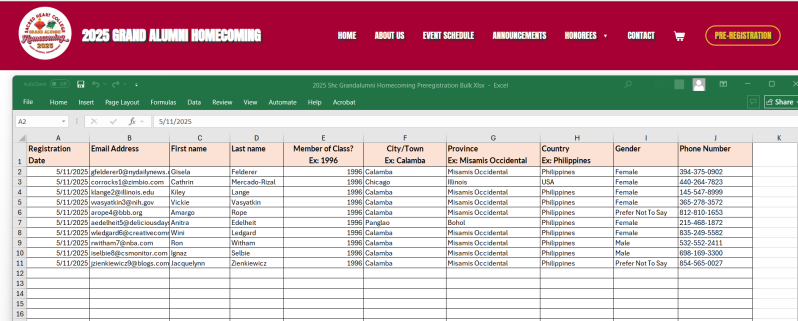
Download the template below by hitting the "Download" button. On your computer/laptop, open the downloaded Excel file template. Fill it out with the details of your class members. You may enter either individual valid email addresses for each member or use a single valid email address for the group.
Frequently Asked Questions (FAQs) about Bulk Upload
Below is the screenshot of the sample filled out Excel template.
See step 2 below after you have filled out the Excel template file.

STEP 2: Upload the Completed/Filled Out Pre-Registration Excel File
Fill out the form below then upload your completed pre-registration in Excel format then click the "Upload File" button.
This feature will be available until 8:00pm of May 14, 2026 (Thursday). This is to give enough time for the event hosts to validate and merge your uploaded file into the master list.